

A session ends, the client walks out happy, and then comes the part most studios never plan, delivering the podcast files to the client. In most studios that happens in whatever channel the client already uses. A first cut on WhatsApp, with feedback coming back as voice notes. Or an email thread that grows with every round and says "around minute twelve, the bit where he laughs." Or Frame.io, which works, but costs a lot for one feature.
We used Frame.io in our studio, because it was the only option that gave reviews a real structure. We were paying a few hundred dollars a month for it.
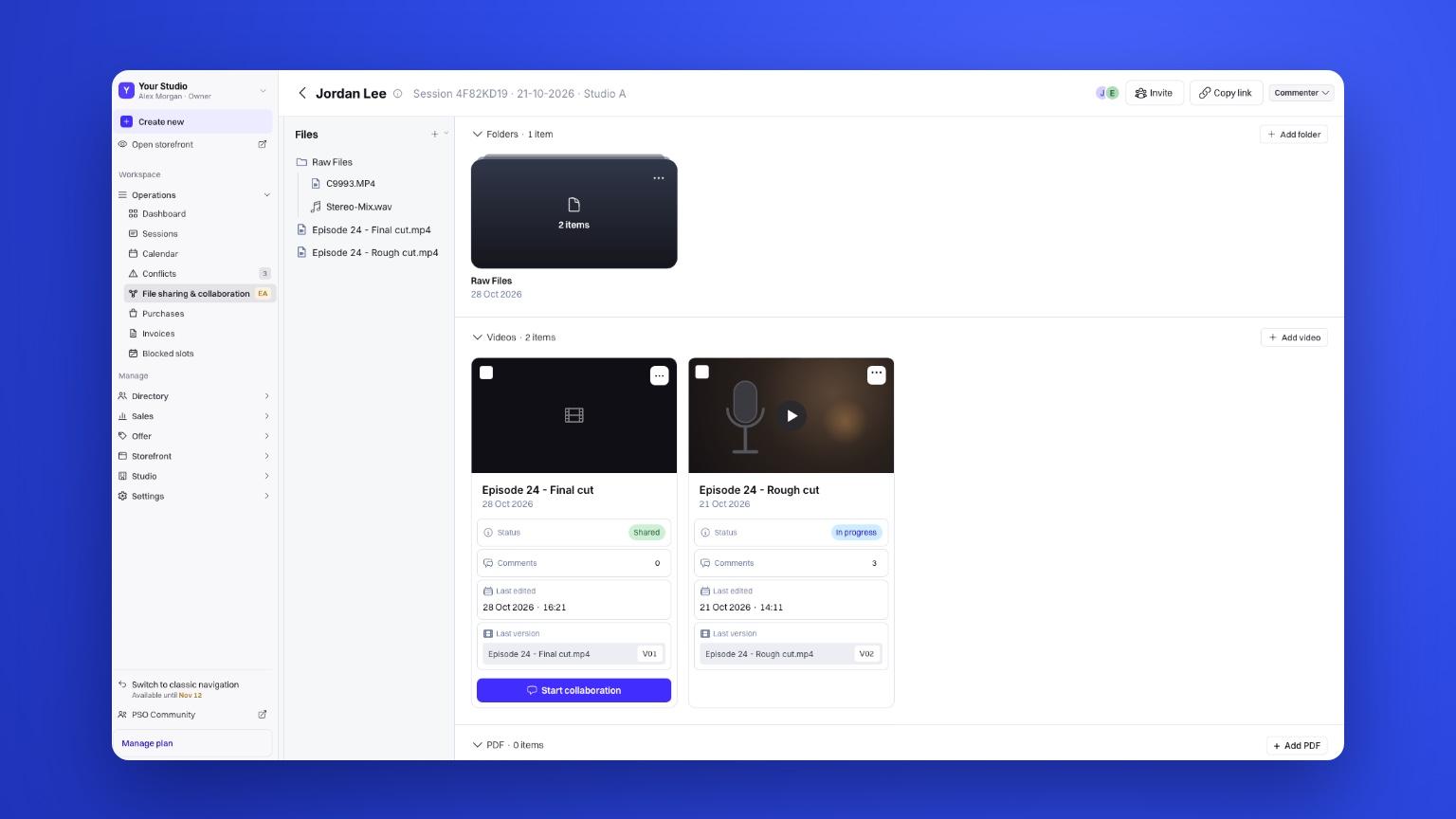
The cleanest way to deliver podcast files to clients is to attach them to the session they came from, so the client finds every file, every version and every comment on their own session page. In Podyx this sits on top of the Google Drive or Dropbox you already use, so there's nothing to migrate and no extra storage bill.
Why file delivery breaks in most studios
Nobody designs it. Studios use whichever channel the client answers on. WhatsApp and email are free and everyone has them, but neither was built for reviewing an edit. Feedback comes in as a voice note or a rough timestamp, versions get mixed up, and the final file is a link somewhere up the thread that has expired by the time the client looks for it. Frame.io fixes the structure, but you pay a lot for a tool that does one job, and it sits apart from the booking and the client’s profile.
| Channel | What you get | What it costs you |
|---|---|---|
| Fast replies | Feedback lost in chat and voice notes, files hard to find later | |
| Everyone has it | Long threads, rough timestamps, links that expire | |
| Frame.io | Structured review with timestamps and versions | A few hundred dollars a month, separate from the client's profile |
| Podyx | Structured review and delivery on the session | Nothing to migrate, runs on your own Drive or Dropbox |
The cost isn't the link. It's the time your team spends finding things, and the moment a client feels their episode slipped through the cracks. Delivery is the last thing a client experiences before deciding whether to book again, which makes it a client retention problem more than an admin one.
It's also one of the few processes most studios never write down. If you have SOPs for opening and closing the studio but none for how files leave the building, this is the gap.
What we changed in our studio
We stopped sending files anywhere. Every file for a session now lives on that session in Podyx, and the client finds it on their own profile.
We kept Google Drive. Our engineers still save exports to the same folders they always have. The only thing that changed is where the link goes, and where the client looks.
We cancelled Frame.io. Client reviews happen on the session too, with comments pinned to the exact moment in the edit. The editor sees the same comments the client left, in the same place, so nothing gets lost in a forward.
The result is one place to look for the client and one place to look for the team. When a new producer joins, there's no tribal knowledge about where things are kept, which matters a lot if you're trying to build a team that runs without you.
How do you send podcast files to clients?
You attach a share link from your Google Drive or Dropbox to the session, and the client downloads the files from their session page.
Step 1
In Google Drive, click Share, set access to Anyone with the link, and copy the link. Dropbox works the same way.
Step 2
Open the session in Podyx. Every session's files are also listed under File sharing & collaboration in the sidebar.
Step 3
Click Add video or Add PDF and paste the link. Use Add folder to keep raw files, like the camera and audio exports, together.
Step 4
Your client opens their session, goes to the Files tab, opens the folder and downloads what they need.
Files can be audio, video or PDFs, so show notes, release forms and thumbnails can sit next to the episode.
How do you get client feedback on a podcast edit?
You start a collaboration on the video, and the client watches it in the browser and comments on the exact moment they want changed.
Step 1
On the session, pick the video and click Start collaboration. Podyx emails everyone in the session when it's ready to watch.
Step 2
The client opens the Files tab and clicks Review & comment.
Step 3
They type a comment and the timestamp is captured automatically. They can also mark a range instead of a single moment, which helps when a whole section needs tightening.
Step 4
When the next cut is ready, add it as a new version. Manage versions lets you compare cuts side by side and check that every fix landed.
The original file stays untouched and downloadable the whole time.
Do clients need to sign in to see their files?
Not if they use the link. When you start a collaboration, the client gets an email with a link that opens the review directly, no sign-in needed. The same goes for an editor or anyone else you share a review link with. If they go to their session page on their own, they sign in to their account first, the same one they created when they booked.
Bringing your editor in
Most studios work with editors who aren't on the session. You can share a review link and either limit it to a specific email address or leave it open to anyone with the link. There are two roles, Viewer and Commenter, so a freelance editor can read every client note without being able to add their own, or join the conversation if you want them to.
Turn delivery into something you charge for
Once delivery is a clean experience, it's worth charging for. Podyx lets you offer file transfer as an option at booking, so delivery becomes a paid service rather than a favour your team does at the end of the day. It's the same logic as upselling at checkout, and one more way of earning beyond the hourly booking.
Anything else the client needs
Not everything is a file. A published YouTube link, a Riverside recording or a booking link for the next session can go on the session too. Click Add link at the bottom of the session page, paste it and save. The client finds it under the Links tab, next to their files.
How to tell if it's working
Watch three things over the next month. The number of "where are my files?" messages in your inbox and on WhatsApp should drop toward zero. Review rounds should close faster, because every comment arrives pinned to a moment instead of described in an email. And if you track client satisfaction after each session, delivery should stop showing up as a complaint.
If all three move, the separate review tool is the next thing to cancel. For us that was Frame.io, and it's one less subscription in a stack that already covers bookings and payments in the same place.


